# 常用编码技巧
# 1.创建一个干净的对象
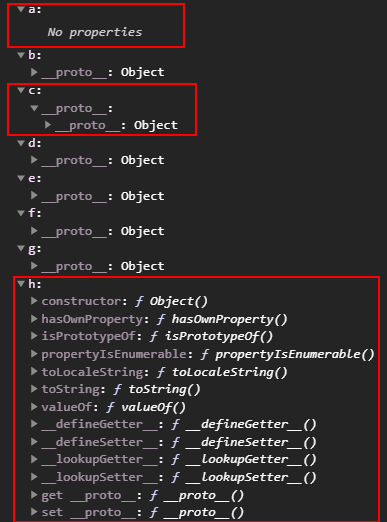
使用Object.create(null)可以声明一个干净原型链,也就是原型上没有任何继承属性或方法的对象。这个 API 在 vue 源码中有多处用到,在遍历对象时,有一点点的性能上提升。
下面的结果可以得出 4 种不同的结果
- a 的proto为 undefined
- c 的proto为一个没有任何属性和方法的对象
- h 的proto为 null,而 h 本身则为proto对象
- 其他变量的结果都一致相同
const a = Object.create(null)
const b = Object.create(Object.prototype)
const c = Object.create({})
const d = {}
const e = new Object(null)
const f = new Object()
const g = new Object({})
const h = new Object(Object.prototype)

console.log(a.__proto__) // undefined
console.log(c.__proto__) // {}
console.log(h.__proto__) // null
console.log({ a, b, c, d, e, f, g, h })
2
3
4
5
6
7
8
9
10
11
12
13
# 2.使用normalizeNamespace函数
vuex 暴露的几个映射方法:{ mapState, mapMutations, mapGetters, mapActions }都使用了normalizeNamespace()来包了一层。
这种闭包思路在处理一些公共逻辑时非常有用。
// define
function normalizeNamespace(fn) {
  return (namespace, map) => {
    if (typeof namespace !== 'string') {
      map = namespace
      namespace = ''
    } else if (namespace.charAt(namespace.length - 1) !== '/') {
      namespace += '/'
    }
    return fn(namespace, map)
  }
}

// useage
export const mapState = normalizeNamespace((namespace, actions) => {
  // ...
})

// useage in component
mapState('nameSpace', ['a', 'b'])
mapState(['a', 'b'])
2
3
4
5
6
7
8
9
10
11
12
13
14
15
16
17
18
19
20
21
# 3.使用逻辑运算符
# 3.1 取整操作
相当于使用了Math.floor()操作,因为按位操作只支持 32 位的整型,所以小数点部分全部都被抛弃。
注意!>>> 符号不可对负数取整
// 使用 ~~
console.log(~~3.14) // 3
console.log(~~-3.14) // -3
console.log(~~0) // 0

// 使用 >>
console.log(3.14 >> 0) // 3
console.log(-3.14 >> 0) // -3
console.log(0 >> 0) // 0

// 使用 <<
console.log(3.14 << 0) // 3
console.log(-3.14 << 0) // -3
console.log(0 << 0) // 0

// 使用 |
console.log(3.14 | 0) // 3
console.log(-3.14 | 0) // -3
console.log(0 | 0) // 0

// 使用 >>>
console.log(3.14 >>> 0) // 3
console.log(0 >>> 0) // 3
console.log(-3.14 >>> 0) // 4294967293
console.log(-2.14 >>> 0) // 4294967294
console.log(-1.14 >>> 0) // 4294967295
2
3
4
5
6
7
8
9
10
11
12
13
14
15
16
17
18
19
20
21
22
23
24
25
26
# 3.2 使用~~配合indexOf进行匹配数组
const arr = [1, 2, 3]

// -- before --
arr.indexOf(1) > -1  // true
arr.indexOf(1) === 0   // true
arr.indexOf(1) !== -1   // true
arr.indexOf(1) === -1   // false

// -- after --
// 存在,等效于 arr.indexOf(1) > -1
~arr.indexOf(1) // true

// 不存在,等效于 arr.indexOf(1) === -1
!~arr.indexOf(1) // false
2
3
4
5
6
7
8
9
10
11
12
13
14
# 3.3 使用&判断奇偶数
除了 0 和偶数外都返回的是 1
console.log(7 & 1) // 1
console.log(1.1 & 1) // 1
console.log(-1.1 & 1) // 1

console.log(8 & 1) // 0
console.log(0 & 1) // 0

// -- before --
console.log( 4 % 2 === 0) // true
console.log( 5 % 2 === 0) // false

// -- after --
console.log(!!(5 & 1)) // true
console.log(!!(6 & 1)) // false
2
3
4
5
6
7
8
9
10
11
12
13
14
# 3.4 使用!!将变量转换为布尔值
- 所有非0的数值返回都是
true,包括负数和浮点数 - 所有对象返回都是
true - 所有非值返回都是
false
// truth值
console.log(!!5) // true
console.log(!!-5) // true
console.log(!!{}) // true
console.log(!![]) // true
console.log(!!Symbol) // true

// faulty值
console.log(!!'') // false
console.log(!!0) // false
console.log(!!undefined) // false
console.log(!!null) // false
console.log(!!void 0) // false
2
3
4
5
6
7
8
9
10
11
12
13
# 3.5 使用^来完成值交换
注意!交换的值必须是整数
// 交换a, b两个值 ?
let a = 1, b = 2

// -- before --
let temp = a
a = b
b = temp

// -- after --
// 使用^
a ^= b
b ^= a
a ^= b

// es6 解构赋值
[a, b ] = [b, a]
2
3
4
5
6
7
8
9
10
11
12
13
14
15
16
# 3.6 使用^判断数值是否为正/负数
数字0为正数
// Syntax
(a ^ b) >= 0 // 相同 => true , 不相同=> false

// truth值
console.log((1^2) >= 0) // true
console.log((0^0) >= 0) // true
console.log((3^0) >= 0) // true
console.log((-1^-2) >= 0) // true

// faulty值
console.log((1^-1) >= 0) // false
console.log((-1^-0) >= 0)  // false
console.log((-1^0) >= 0)  // false
2
3
4
5
6
7
8
9
10
11
12
13
# 3.7 使用^判断数值是否不相等
注意!^会将字符串与数值类型做隐式转换
// -- before --
let a = 6543

if(a !== 3456){...} //

// -- after --
console.log(a^3456) // 5135
console.log(a^'6543') // 0
console.log('6543'^'6543') // 0
console.log(''^'') // 0
2
3
4
5
6
7
8
9
10
# 3.8 使用n(n-1)公式判断2的整幂数
// 2的整幂数包含: 2,4, 8,16, 32, 64, 128, 256, 512, 1024,....

// 如果结果为0 ,则说明n是2的整幂数
// Syntax
(n & (n-1) ) === 0

console.log((2 & (2-1) ) === 0) // true
console.log((4 & (4-1) ) === 0) // true
console.log((64 & (64-1) ) === 0) // true
console.log((3 & (3-1) ) === 0) // false
2
3
4
5
6
7
8
9
10
# 3.9 使用??空值合并操作符
当左侧的操作数为 null 或者 undefined 时,返回其右侧操作数,否则返回左侧操作数。
console.log(null ?? 'default value') // 'default value'
console.log(undefined ?? 'default value') // 'default value'
console.log(0 ?? 'default value') // 0
console.log(false ?? 'default value') // false
console.log('' ?? 'default value') // ''
console.log(NaN ?? 'default value') // NaN
2
3
4
5
6
# 3.10 使用逻辑空赋值运算符??= 赋值
逻辑空赋值运算符 (x ??= y) 仅在 x 是 nullish (null 或 undefined) 时对其赋值。
const a = { duration: 50 }
a.duration ?? = 10
console.log(a.duration) // 50
a.speed ??= 25
console.log(a.speed) // 25
2
3
4
5
# 3.11 使用可选链操作符?.赋值
允许读取位于连接对象链深处的属性的值,而不必明确验证链中的每个引用是否有效。?. 操作符的功能类似于 . 链式操作符,不同之处在于,在引用为空(nullish ) (null 或者 undefined) 的情况下不会引起错误,该表达式短路返回值是 undefined。与函数调用一起使用时,如果给定的函数不存在,则返回 undefined。
const obj = {
    name: 'Kyle',
    cat: {
        name: 'Kitty'
    }
}

// -- before --
console.log(obj.dog && obj.dog) // undefined
console.log(obj.dog && obj.dog && obj.dog.name) // undefined
console.log(obj.someNonExistentMethod && obj.someNonExistentMethod()) // undefined

// -- after --
console.log(obj?.dog) // undefined
console.log(obj.dog?.name) // undefined
console.log(obj.someNonExistentMethod?.()) // undefined
2
3
4
5
6
7
8
9
10
11
12
13
14
15
16
# 4.判断是否为空对象
const data = {}
// 方法1
const isEmptyObj = obj => obj !== null && Object.getOwnPropertyNames(obj).length === 0
// 方法2
const isEmptyObj = obj => obj !== null && Object.keys(obj).length === 0
// 方法3
const isEmptyObj = obj => obj !== null && JSON.stringify(obj) === '{}'
// 方法4
function isEmptyObj(obj) {
  for (const key in obj) {
    return false
  }
  return true
}
2
3
4
5
6
7
8
9
10
11
12
13
14
# 5.合理的使用 noop 设置默认值
Function.prototype竟然是个函数类型,而自定义函数的原型却是对象类型。
typeof Function.prototype === 'function' // true

function People() {}
typeof People.prototype === 'object'

// 函数类型
const noop = Function.prototype

// 对象类型
const noop = () => ({})
const noop = Object.create(null)
2
3
4
5
6
7
8
9
10
11
# 6. compose组合函数的应用
组合函数就是将两个或两个以上的函数组合生成一个新函数的过程。
# 6.1 固定两个参数的组合函数
function composeFn(f, g) {
  return function (x) {
    return f(g(x))
  }
}
2
3
4
5
# 6.2 可传多个参数的组合函数
通过Array.prototype.reduce方法来实现组合函数的调度,对应的执行顺序是从左到右。
function compose(...funcs) {
  return function (x) {
    return funcs.reduce((arg, fn) => {
      return fn(arg)
    }, x)
  }
}

// same as
function compose(...funcs) {
  return x => funcs.reduce((arg, fn) => fn(arg), x)
}
2
3
4
5
6
7
8
9
10
11
12
# 6.3 组合函数的效果
function lowerCase(input) {
  return input && typeof input === "string" ? input.toLowerCase() : input
}

function trim(input) {
  return typeof input === "string" ? input.trim() : input
}

function split(input, delimiter = ",") {
  return typeof input === "string" ? input.split(delimiter) : input
}

console.log(compose(lowerCase, trim, split)(' a,B,C ')) // ['a','b','c']
2
3
4
5
6
7
8
9
10
11
12
13
# 6.4 组合函数的场景
- 中间件
- 业务数据转换处理
- 数据校验
# 7. curry柯里化函数的应用(待填)
柯里化(Currying)是一种处理函数中含有多个参数的方法,并在只允许单一参数的框架中使用这些函数。这种转变是现在被称为 “柯里化” 的过程,在这个过程中我们能把一个带有多个参数的函数转换成一系列的嵌套函数。它返回一个新函数,这个新函数期望传入下一个参数。当接收足够的参数后,会自动执行原函数。
function curry(func) {
  return function curried(...args) {
    if (args.length >= func.length) { // 通过函数的length属性,来获取函数的形参个数
      return func.apply(this, args);
    } else {
      return function (...args2) {
        return curried.apply(this, args.concat(args2));
      };
    }
  }
}
2
3
4
5
6
7
8
9
10
11
# 8. memorize缓存函数的应用
缓存函数是将函数的计算结果缓存起来(指的是缓存在内存当中),当下次以相同的参数调用该函数时,则直接返回已经缓存的结果,而无需再次执行函数。这是一种常见的以空间换时间的优化手段。
要实现缓存函数的功能,我们可以将经过序列化的参数作为key,再把首次调用的结果作为value存储到对象中。在每次执行函数调用前,都先判断缓存中是否含有对应的key,如果有的话,直接返回该key对应的值。
# 8.1 缓存函数的实现
function memorize(fn){
  const cache = Object.create(null)
  return function (...args){
   	const _args = JSON.stringify(args)
    return cache[_args] ||(cache[_args]= fn.apply(fn,args))
  }
}

// same as 使用Map来缓存
function memorize(fn) {
  const cache = new Map()
  return function (...args) {
     const _args = JSON.stringify(args)
     return cache.get(_args) || (cache.set(_args, fn.apply(fn, args)))
  }
}
2
3
4
5
6
7
8
9
10
11
12
13
14
15
16
# 8.2 缓存函数的效果
 function fibonacci(index) {
    return index < 1 ? 0 : index <= 2 ? 1 : fibonacci(index - 1) + fibonacci(index - 2)
 }

const fib = memorize(fibonacci)

console.time('start1=>')
fib(40)
console.timeEnd('start1=>') // start1=>: 1722.83984375

console.time('start2=>')
fib(40)
console.timeEnd('start2=>') //  start2=>: 0.010986328125 ms

console.time('start3=>')
fib(40)
console.timeEnd('start3=>') // start3=>: 0.01611328125 ms

console.time('start4=>')
fib(40)
console.timeEnd('start4=>') // start4=>: 0.013916015625 ms
2
3
4
5
6
7
8
9
10
11
12
13
14
15
16
17
18
19
20
21
# 8.3 缓存函数的使用场景
- 较复杂的绘图
- 数据量较大的表单对比
# 9. 偏函数应用(待填)
# 10. 尾调用优化
ECMAScript 6规范新增了一项内存管理优化机制,让JavaScript引 擎在满足条件时可以重用栈帧。具体来说,这项优化非常适合“尾调 用”,即外部函数的返回值是一个内部函数的返回值。
具体表达式如下
function outerFunction(){
    return innerFunction() // 尾调用
}
2
3
# 10.1 尾调用的原理
| ES6优化前 | ES6优化后 | |
|---|---|---|
| 1 | 执行到outerFunction,第1个栈帧被推倒栈上 | --- |
| 2 | outerFunction函数体,到return语句。计算值必须先计算innerFunction | --- |
| 3 | 执行到innerFunction 函数体,第二个栈帧被推到栈上。 | 引擎发现把第一个栈帧弹出栈外也没问题,因为innerFunction的返回值也是 outerFunction的返回值。 |
| 4 | 执行 innerFunction函数体,计算其返回值。 | 弹出 outerFunction 的栈帧。 |
| 5 | 将返回值传回 outerFunction,然后 outerFunction再返回值。 | 执行到 innerFunction函数体,栈帧被推到栈上。 |
| 6 | 将栈帧弹出栈外。 | 执行 innerFunction函数体,计算其返回值。 |
| 7 | 将 innerFunction的栈帧弹出栈外。 |
# 10.2 尾调用的条件
尾调用优化的条件就是确定外部栈帧真的没有必要存在了。
- 代码在严格模式下执行
- 外部函数的返回值是对尾调用函数的调用
- 尾调用函数返回后不需要执行额外的逻辑
- 尾调用函数不是引用外部函数作用域中自由变量的闭包
# 10.3 不符合尾调用优化的错误示例
'use strict'

// 违反第2条,无优化:尾调用没有返回
function outerFunction(){
    innerFunction()
}

// 违反第4条,无优化:尾调用没有直接返回
function outerFunction(){
    let innerFunctionResult = innerFunction()
    return innerFunctionResult()
}

// 违反第3条,无优化:尾调用返回后必须转型为字符串
function outerFunction(){
    return innerFunctionResult().toString()
}

// 违反第4条,无优化:尾调用只是一个闭包
function outerFunction(){
   let foo = 'bar'
   function innerFunction(){
   	 return foo
   }
   return innerFunction()
}
2
3
4
5
6
7
8
9
10
11
12
13
14
15
16
17
18
19
20
21
22
23
24
25
26
# 10.4 符合尾调用优化正确示例
差异化尾调用和递归尾调用是容易让人混淆的地方。无论是递归尾调用还是非递归尾调用,都可以应用优化。引擎本身并不区分尾调用中调用的是当前函数自身还是其他函数。不过使用尾调用优化在递归场景下才是最明显的,因为递归代码最容易在栈内存中迅速产生大量的栈帧。
'use strict'

// 有优化:栈帧销毁前执行参数计算
function outerFunction(a,b){
  return innerFunction(a, b)
}

// 有优化:初始返回值不涉及栈帧
function outerFunction(a,b){
  if(a < b){
     return a
  }
  return innerFunction(a, b)
}

// 有优化:两个内部函数都在尾部
function outerFunction(condition){
   return condition ? innerFunctionA() :innerFunctionB()
}
2
3
4
5
6
7
8
9
10
11
12
13
14
15
16
17
18
19
20
# 10.5 尾调用优化的实例代码
可以通过把简单的递归函数转换为待优化的代码来加深对尾调用优化的理解。下面代码仍然拿斐波那契数列函数做试验:
'use strict'

// 返回语句中有一个相加的操作,导致栈帧数的内存复杂度是O(n)
function fibonacci(n: number): number {
   return n < 1 ? 0 : n <= 2 ? 1 : fibonacci(n - 1) + fibonacci(n - 2)
}

// 重构后满足尾调用优化的所有条件

// 执行递归
function fibImpl(a: number, b: number, n: number): number {
  if (n === 0) {
    return a
  }
  return fibImpl(b, a + b, n - 1)
}

// 基础框架
function fib(n: number) {
   return fibImpl(0, 1, n)
}

// -- before --
console.time('fibonacci(40)==>')
console.log(fibonacci(40)) // 102334155
console.timeEnd('fibonacci(40)==>') // fibonacci(40)==>: 667.714111328125 ms

// -- after --
console.time('fib(40)==>')
console.log(fib(40)) // 102334155
console.timeEnd('fib(40)==>') // fib(40)==>: 0.113037109375 ms
2
3
4
5
6
7
8
9
10
11
12
13
14
15
16
17
18
19
20
21
22
23
24
25
26
27
28
29
30
31
- 尾调用优化]
- 《JavaScript高级程序设计(第4版)》—— 函数 第10章 / 307页
# 11.函数重载(待填)
# 12. 使用Array.property.reduce()
在ES的数组迭代方法中,使用Array.property.reduce确实是个让人不容小觑的API。
# 12.1 模拟map()方法
 const data = [
      { name: 'Harry Potter', house: 'Gryfindor', points: 500 },
      { name: 'Cedric Diggory', house: 'Hufflepuff', points: 750 },
      { name: 'Tonks', house: 'Hufflepuff', points: 0 },
      { name: 'Ronald Weasley', house: 'Gryfindor', points: 100 },
      { name: 'Hermione Granger', house: 'Gryfindor', points: 1270 }
  ]

 // 使用reduce实现
 const result = data.reduce((a, { name }) => {
     a.push(name)
     return a
 }, [])

 // 等价于 =>
 const result data.map({name} => name)

// result -> ["Harry Potter", "Cedric Diggory", "Tonks", "Ronald Weasley", "Hermione Granger"]
2
3
4
5
6
7
8
9
10
11
12
13
14
15
16
17
18
# 12.2 模拟filter()方法
const data = [
    { name: 'Harry Potter', house: 'Gryfindor', points: 500 },
    { name: 'Cedric Diggory', house: 'Hufflepuff', points: 750 },
    { name: 'Tonks', house: 'Hufflepuff', points: 0 },
    { name: 'Ronald Weasley', house: 'Gryfindor', points: 100 },
    { name: 'Hermione Granger', house: 'Gryfindor', points: 1270 }
]

// 使用 reduce
const result = data.reduce((a, { house }) => {
    house === 'Hufflepuff' && a.push(house)
    return a
}, [])

// 等价于 =>
const result = data.filter(({ house }) => house === 'Hufflepuff')
2
3
4
5
6
7
8
9
10
11
12
13
14
15
16
# 12.3 将对象中的某个值合并为一个数组
场景描述:将对象数据中某个属性拼接成一个数组,要求去重并排序
// 获取指定长度内涵随机数的一维数组集合
const getMadomList = (length = 5) => Array(length).fill().map(() => ~~(Math.random() * 100))

const data = [
      { fileName: 'aa.js', list: getMadomList() },
      { fileName: 'bb.js', list: getMadomList() },
      { fileName: 'cc.js', list: getMadomList() },
      { fileName: 'dd.js', list: getMadomList() },
      { fileName: 'ee.js', list: getMadomList() }
 ]
/* 预期结果
 result ->  [8, 9, 18, 27, 30, 32, 36, 38, 41, 42, 50, 53, 59, 65, 71, 75, 77, 79, 80, 91, 93, 95, 99]
*/

// 使用 reduce 实现
 const result = data.reduce((arr, current) => {
     arr.push(...current.list)
     return Array.from(new Set(arr)).sort((a, b) => a - b)
 }, [])

 // 等价于 =>
 const getResult = arr => {
     const result = []
     arr.forEach(({ list }) => (result = [...result, ...list]))
     return Array.from(new Set(result)).sort((a, b) => a - b)
 }
2
3
4
5
6
7
8
9
10
11
12
13
14
15
16
17
18
19
20
21
22
23
24
25
26
# 12.4 数组筛选指定对象
遍历两次
const data = [
    { name: 'Harry Potter', house: 'Gryfindor' },
    { name: 'Cedric Diggory', house: 'Hufflepuff' },
    { name: 'Tonks', house: 'Hufflepuff' },
    { name: 'Ronald Weasley', house: 'Gryfindor' },
    { name: 'Hermione Granger', house: 'Gryfindor' }
]
/* 预期结果
  result ->  ['Cedric Diggory', 'Tonks' ]
*/

// 使用 reduce 实现
const result = data.reduce((arr, current) => {
    current.house === 'Hufflepuff' && arr.push(current.name)
    return arr
}, [])

// 等价于 =>
const result = data.filter(({ house }) => house === 'Hufflepuff').map(({ name }) => name)
2
3
4
5
6
7
8
9
10
11
12
13
14
15
16
17
18
19
# 12.5 按不同条件对数据进行分组
const data = [6.1, 6.2, 4.001, 6.2, 3.2, 5.3]
const words = ['one', 'two', 'three']

/* 预期结果
  groupBy(data, Math.floor)
  result ->  {'4': [4.2], '6': [6.1, 6.3]}

  groupBy(words, 'length')
  result ->  {'3': ['one', 'two'], '5': ['three']}
*/

// 使用 reduce 实现
const groupBy = (arr, c) =>
 	arr.reduce((o, i) => {
        const k = typeof c === 'function' ? c(i) : i[c]
        !o[k] && (o[k] = [])
        o[k].push(i)
        return o
    }, Object.create(null))

// 等价于 =>
const groupBy = (arr, c) => {
    const o = Object.create(null)
    arr.forEach(i => {
        const k = typeof c === 'function' ? c(i) : i[c]
        !o[k] && (o[k] = [])
        o[k].push(i)
    })
    return o
}
2
3
4
5
6
7
8
9
10
11
12
13
14
15
16
17
18
19
20
21
22
23
24
25
26
27
28
29
30
# 12.6 合并数据到单个数组
const data = [
    { name: 'Harry Potter', house: 'Gryfindor' },
    { name: 'Cedric Diggory', house: 'Hufflepuff' },
    { name: 'Tonks', house: 'Hufflepuff' },
    { name: 'Ronald Weasley', house: 'Gryfindor' },
    { name: 'Hermione Granger', house: 'Gryfindor' }
]

const points = {
    HarryPotter: 500,
    CedricDiggory: 750,
    RonaldWeasley: 100,
    HermioneGranger: 1270
}
/* 预期结果
  result ->
  [
     {name: "Harry Potter", house: "Gryfindor", points: 500},
     {name: "Cedric Diggory", house: "Hufflepuff", points: 750},
     {name: "Tonks", house: "Hufflepuff", points: 0},
     {name: "Ronald Weasley", house: "Gryfindor", points: 100},
     {name: "Hermione Granger", house: "Gryfindor", points: 1270}
 ]
*/

// 使用 reduce 实现
const result = data.reduce((a, c) => {
    const k = c.name.replace(' ', '')
    c.point = points.hasOwnProperty(k) ? points[k] : 0
    a.push(c)
    return a
}, [])

// 等价于 =>
const result = data.map(item => {
    const k = item.name.replace(' ', '')
    item.point = points.hasOwnProperty(k) ? points[k] : 0
    return item
})
2
3
4
5
6
7
8
9
10
11
12
13
14
15
16
17
18
19
20
21
22
23
24
25
26
27
28
29
30
31
32
33
34
35
36
37
38
39
# 12.7 合并数据到单个对象
const data = [
    { name: 'Harry Potter', house: 'Gryfindor' },
    { name: 'Cedric Diggory', house: 'Hufflepuff' },
    { name: 'Tonks', house: 'Hufflepuff' },
    { name: 'Ronald Weasley', house: 'Gryfindor' },
    { name: 'Hermione Granger', house: 'Gryfindor' }
]

const points = {
    HarryPotter: 500,
    CedricDiggory: 750,
    RonaldWeasley: 100,
    HermioneGranger: 1270
}
/* 预期结果
  result ->
  {
    CedricDiggory: {house: "Hufflepuff", point: 750},
    HarryPotter: {house: "Gryfindor", point: 500},
    HermioneGranger: {house: "Gryfindor", point: 1270},
    RonaldWeasley: {house: "Gryfindor", point: 100},
    Tonks: {house: "Hufflepuff", point: 0}
  }
*/

// 使用 reduce 实现
 const result = data.reduce((a, c) => {
     const k = c.name.replace(' ', '')
     c.point = points.hasOwnProperty(k) ? points[k] : 0
     Reflect.deleteProperty(c, 'name')
     a[k] = c
     return a
 }, {})

// 等价于 =>
const getResult = arr => {
    const o = Object.create(null)
    data.forEach(item => {
      const k = item.name.replace(' ', '')
      item.point = points.hasOwnProperty(k) ? points[k] : 0
      Reflect.deleteProperty(item, 'name')
      o[k] = item
    })
    return o
}
2
3
4
5
6
7
8
9
10
11
12
13
14
15
16
17
18
19
20
21
22
23
24
25
26
27
28
29
30
31
32
33
34
35
36
37
38
39
40
41
42
43
44
45
常用CSS技巧 →